やり方
枠・リング・傾き
アイコンを円盤の上に載せる、スパイラルリングで綴じる、少し傾ける、そしてそれらをまとめた5つの名前付きプリセットを説明します。
3つのオプションhousing、rings、turnは、デザイン自身の絵には手を加えず、アイコン全体を変えます。どれも指定しなければ、これらのオプションがなかったときと、出力はバイト単位で同じです。そのため、プログラムにオプションを加えても、それを使わないアイコンは変わりません。
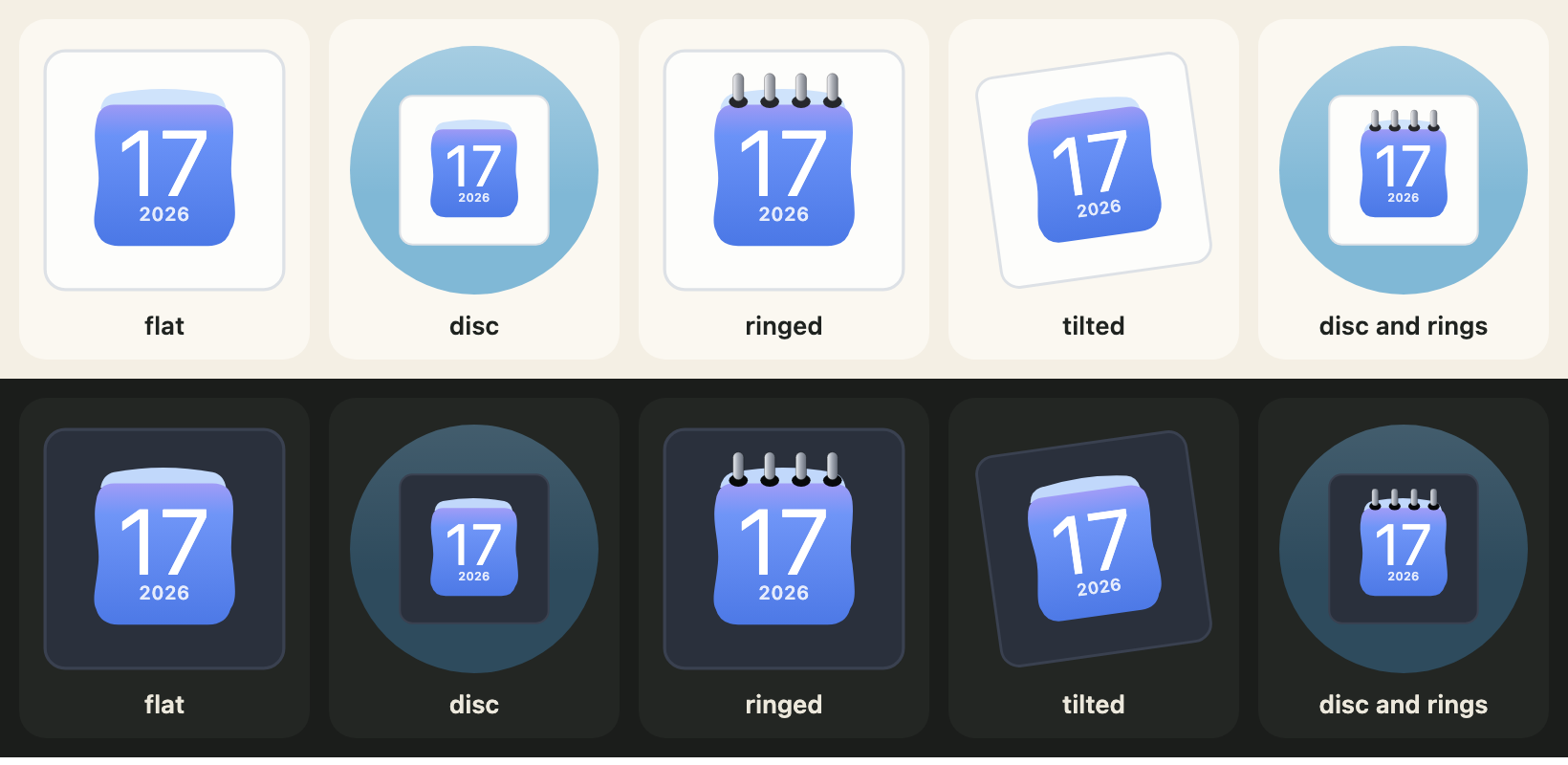
枠(housing)
housing: "circle"は、アイコンを色付きの円盤の上に載せます。初期値の"square"は、アイコンだけです。housingColourには、CSSの色を何でも指定できます。初期値はやわらかな青(ダークでは深い青)です。CALENDAR_HOUSINGSが2つの値を並べています。
import { CALENDAR_HOUSINGS, calendarIcon } from "@johnmorrisdotca/koyomi-calendars";

console.log(CALENDAR_HOUSINGS.join(" "));
const disc = calendarIcon({ theme: "badge", month: 3, day: 9, housing: "circle", housingColour: "#335577" });
console.log(disc.includes("<circle"), disc.includes("#335577"));
const plain = calendarIcon({ theme: "badge", month: 3, day: 9 });
console.log(plain.includes("<circle"));
// square circle
// true true
// false
square circle
true true
falseリング(rings)
rings: trueは、ページの上辺にスパイラルリングを描きます。もともと綴じ具のないデザイン(badge、frame、sun、roll、plain、squircle)が対象です。数(0から24)で本数を決められ、trueならページに合わせます。残りの12のデザインは自分の綴じ具を描くので、このオプションは無視されます。
import { calendarIcon } from "@johnmorrisdotca/koyomi-calendars";

const six = calendarIcon({ theme: "squircle", month: 1, day: 1, rings: 6 });
const none = calendarIcon({ theme: "squircle", month: 1, day: 1 });
console.log(six.length > none.length);
const pins = calendarIcon({ theme: "pins", month: 1, day: 1, rings: true });
console.log(pins === calendarIcon({ theme: "pins", month: 1, day: 1 }));
// true
// true
true
true傾き(turn)
turnは、アイコン全体を少し傾けます。単位は度で、正の値は時計回り、負の値は反時計回りです。昔のmacOSのアイコンのような傾きです。範囲は−45から45で、CALENDAR_TURN_MAXは45です。
import { CALENDAR_TURN_MAX, calendarIcon } from "@johnmorrisdotca/koyomi-calendars";

console.log(CALENDAR_TURN_MAX);
console.log(calendarIcon({ month: 5, day: 5, turn: -8 }).includes("rotate(-8"));
console.log(calendarIcon({ month: 5, day: 5, turn: 0 }).includes("rotate"));
// 45
// true
// false
45
true
falseプリセット
プリセットは、これらのオプションの組み合わせに付けた名前です。CALENDAR_PRESETSにあり、flat(何もなし)、disc、ringed、tilted(−8度の傾き)、disc-ringedです。自分で指定したオプションは、プリセットより優先されます。calendarPresetOfは、フォームやアドレスの文字列をプリセット名に変換し、なければnullを返します。
import { CALENDAR_PRESETS, calendarIcon, calendarPresetOf } from "@johnmorrisdotca/koyomi-calendars";

console.log(Object.keys(CALENDAR_PRESETS).join(" "));
console.log(JSON.stringify(CALENDAR_PRESETS["disc-ringed"]));
console.log(calendarPresetOf("disc"), calendarPresetOf("nope"));
const svg = calendarIcon({ theme: "squircle", month: 1, day: 1, preset: "disc-ringed", turn: 0 });
console.log(svg.includes("rotate"));
// flat disc ringed tilted disc-ringed
// {"housing":"circle","rings":true}
// disc null
// false
flat disc ringed tilted disc-ringed
{"housing":"circle","rings":true}
disc null
falseめくるときの枠
アイコン全体がめくられるページになるので、円盤やタイルのあるデザインでは、円盤やタイルもいっしょにめくれます。円盤を動かしたくないときは、円盤は自分で要素の後ろに描き、housingのないアイコンをめくってください。
この日本語は、まだ日本語を母語とする方の確認を受けていません。訂正を歓迎します。