How-to
The Japanese calendar
Japanese public holidays, old calendar dates and the six-day cycle, computed and never looked up, on the tear-off pages and as plain functions.
The package computes three things of the Japanese calendar and never looks them up in a table: the public holidays (国民の祝日), the old calendar date (旧暦) and the day of the six-day cycle (六曜, rokuyō). They are plain functions in the main import and in @johnmorrisdotca/koyomi-calendars/japanese, and the tear-off designs sun, roll and plain can write them in their side columns.
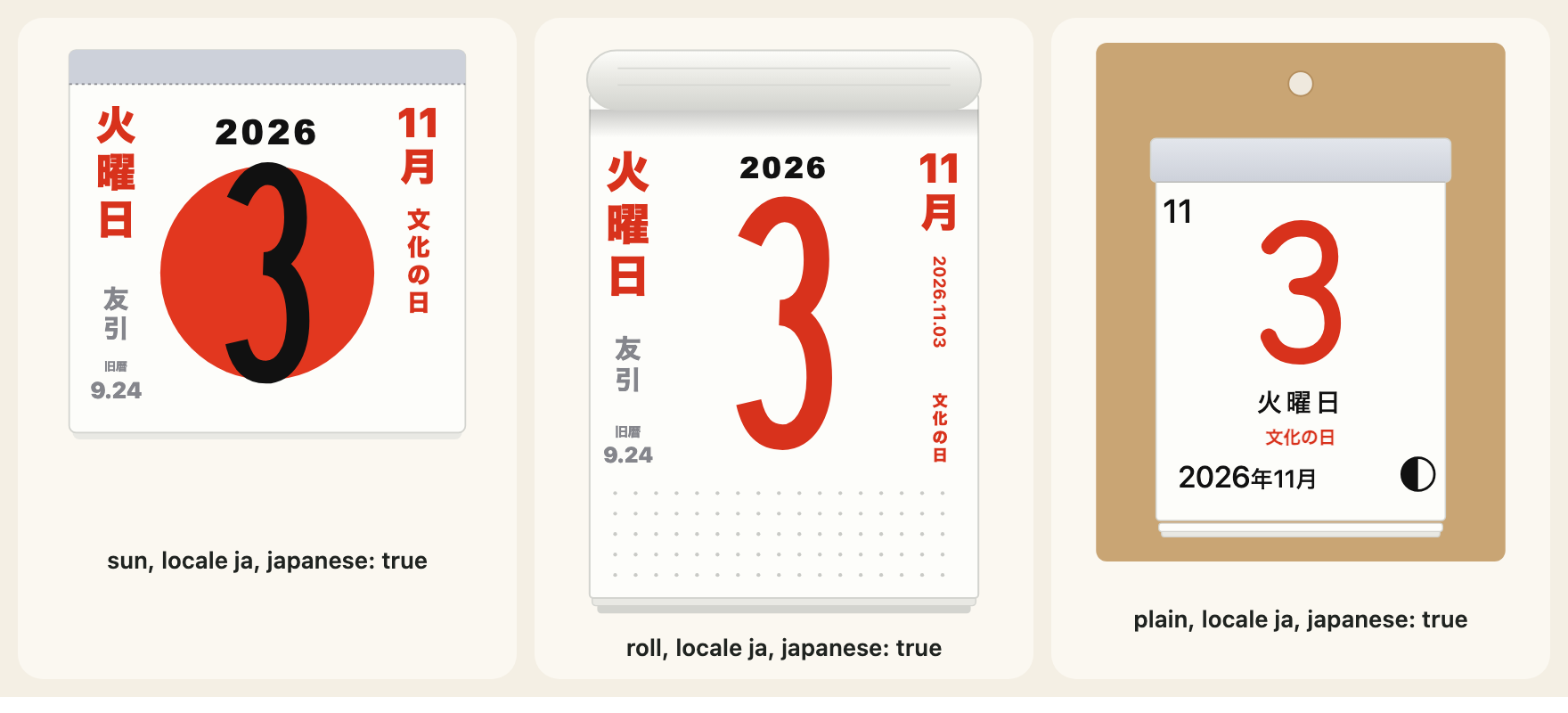
Public holidays
japaneseHoliday(year, month, day) gives the holiday of a date, or null. It follows the Act on National Holidays as amended: the fixed days, the Monday holidays, the equinox days (from the formula the National Astronomical Observatory publishes, so a far year is its prediction), the substitute holiday and the citizens' holiday between two holidays. The years it covers are JAPANESE_HOLIDAY_YEARS; outside them it gives null, because no answer is better than a wrong one.
import { JAPANESE_HOLIDAY_YEARS, japaneseHoliday, japaneseHolidaysOf } from "@johnmorrisdotca/koyomi-calendars/japanese";

console.log(JAPANESE_HOLIDAY_YEARS.join(" to "));
console.log(japaneseHoliday(2026, 11, 3)?.en);
console.log(japaneseHoliday(2027, 1, 1)?.en);
console.log(japaneseHoliday(2026, 11, 4));
console.log(japaneseHoliday(1999, 1, 1));
const holidays = japaneseHolidaysOf(2026);
console.log(holidays?.size);
console.log(holidays?.get("2026-05-06")?.en);
// 2000 to 2099
// Culture Day
// New Year's Day
// null
// null
// 18
// Substitute Holiday
2000 to 2099
Culture Day
New Year's Day
null
null
18
Substitute HolidayjapaneseHolidaysOf(year) gives the whole year as a Map from YYYY-MM-DD to a holiday with an en and a ja name, or null outside the covered years. It is what to pass to a month page as notes.
The old calendar
oldCalendarDate(year, month, day) gives the date in the old lunisolar calendar, as { month, day, leap }, for 1900 to 2100 (OLD_CALENDAR_YEARS), or null.
import { OLD_CALENDAR_YEARS, oldCalendarDate } from "@johnmorrisdotca/koyomi-calendars/japanese";

console.log(OLD_CALENDAR_YEARS.join(" to "));
console.log(JSON.stringify(oldCalendarDate(2026, 11, 2)));
console.log(oldCalendarDate(1850, 1, 1));
// 1900 to 2100
// {"month":9,"day":23,"leap":false}
// null
1900 to 2100
{"month":9,"day":23,"leap":false}
nullThe six-day cycle
rokuyoOf(year, month, day) gives the day's name in the cycle of six (ROKUYO lists them) as { ja, reading, en }, worked out from the old calendar date, or null where that cannot be settled.
import { ROKUYO, rokuyoOf } from "@johnmorrisdotca/koyomi-calendars/japanese";

console.log(ROKUYO.length);
console.log(rokuyoOf(2026, 11, 2)?.reading);
console.log(rokuyoOf(2026, 11, 2)?.en);
console.log(ROKUYO.map((item) => item.reading).join(" "));
// 6
// Senshō
// Senshō (lucky in the morning)
// Taian Shakkō Senshō Tomobiki Senbu Butsumetsu
6
Senshō
Senshō (lucky in the morning)
Taian Shakkō Senshō Tomobiki Senbu ButsumetsuOn the tear-off pages
japanese: true writes all three in the side columns of sun and roll; an object picks some: { holidays: true, oldDate: false, rokuyo: true }. A cell the method cannot settle is left empty. It is off by default, so a page drawn without it is as before. With locale: "ja" the words are Japanese.
import { calendarIcon } from "@johnmorrisdotca/koyomi-calendars";

const page = calendarIcon({ theme: "sun", month: 1, day: 1, year: 2027, locale: "ja", japanese: true });
console.log(page.includes('data-part="side"'));
const some = calendarIcon({ theme: "roll", month: 11, day: 3, year: 2026, locale: "ja", japanese: { holidays: true, oldDate: false, rokuyo: false } });
console.log(some.startsWith("<svg"));
// true
// true
true
trueWeekends and your own holiday names
weekend: "split" draws a Saturday and the Sunday after it on one page, cut by a diagonal, on sun and roll, and only when a year is given and the day is a Saturday or a Sunday. Any other day keeps its own page. calendarWeekend(year, month, day) is the helper that finds the pair.
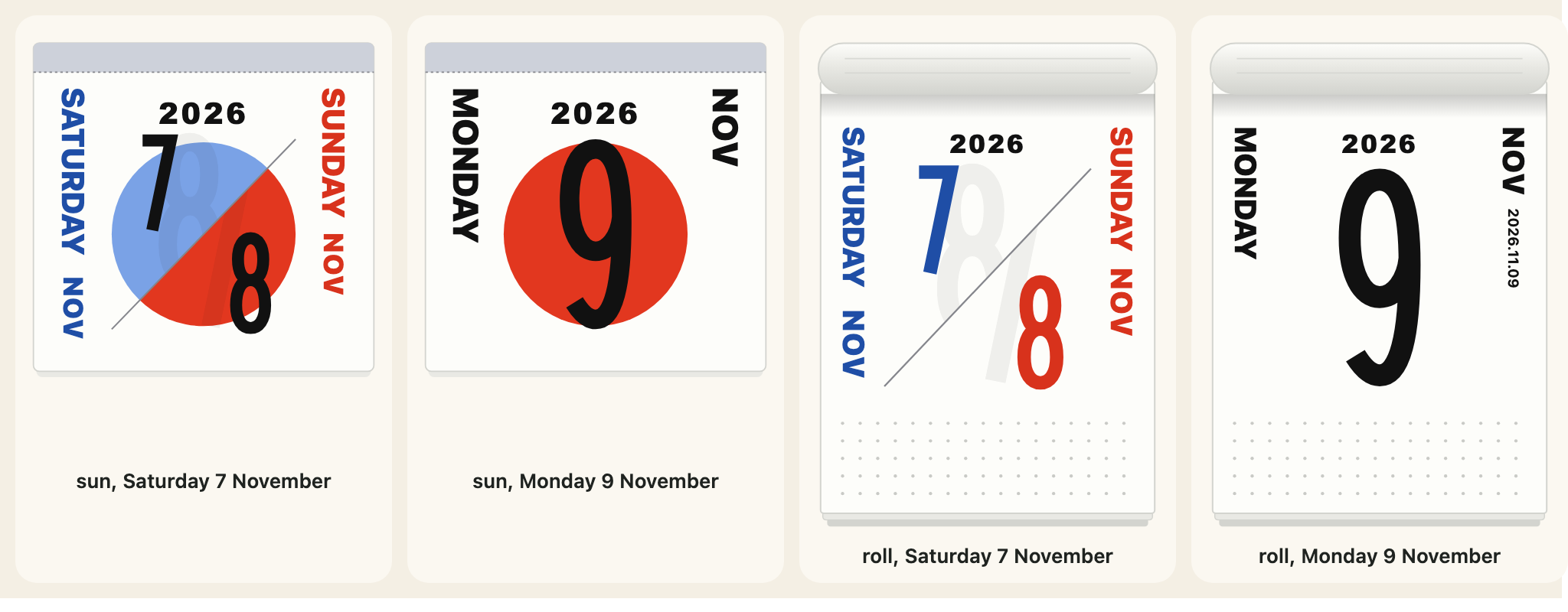
holidays names holidays yourself, by date ("2027-01-01") or by day of every year ("01-01"), as one string or one per language. A name you give wins over the computed one. The library knows no holiday of any other country: give your own.
import { calendarIcon, calendarWeekend } from "@johnmorrisdotca/koyomi-calendars";
console.log(JSON.stringify(calendarWeekend(2026, 11, 7)));
console.log(calendarWeekend(2026, 11, 9));
const split = calendarIcon({ theme: "sun", month: 11, day: 7, year: 2026, weekend: "split" });
console.log(split.includes('data-part="saturday"'), split.includes('data-part="sunday"'));
const named = calendarIcon({ theme: "sun", month: 7, day: 1, year: 2026, holidays: { "07-01": "Canada Day" } });
console.log(named.includes("Canada Day"));
// {"saturday":{"year":2026,"month":11,"day":7},"sunday":{"year":2026,"month":11,"day":8}}
// null
// true true
// true{"saturday":{"year":2026,"month":11,"day":7},"sunday":{"year":2026,"month":11,"day":8}}
null
true
true
trueThe sun's disc, the columns and the moon
mark replaces the red disc behind the day on sun with your own SVG shapes, drawn in a box from -100,-100 to 100,100: your own markup, written as given, with no scripts, styles, event attributes or foreign objects. columns: false leaves the side columns off sun and roll. moon: false leaves the moon phase off plain, which draws it when a year is given. calendarMoon(year, month, day) gives the phase in eighths of a lunation (0 new, 2 first quarter, 4 full, 6 last quarter), a mean lunation that can be a day out near the turn of a phase.
import { calendarIcon, calendarMoon } from "@johnmorrisdotca/koyomi-calendars";

const phase = calendarMoon(2026, 11, 2);
console.log(phase >= 0 && phase < 8, Number.isInteger(phase));
const bare = calendarIcon({ theme: "sun", month: 5, day: 5, year: 2026, columns: false, mark: '<circle r="60" fill="#c33"/>' });
console.log(bare.includes('data-part="side"'));
// true true
// false
true true
falseWhat is not here
No holiday of any country other than what japaneseHoliday computes. A month page takes its notes from you: see Month pages. The sources for the computing are named in the repository's NOTICE.md.